Stacking, virtual chassis and MLAG
Two or more switches can be made to behave as one: a stack or virtual chassis shares a control plane over dedicated links, while MLAG (multi-chassis LAG) keeps two independent control planes and only makes the downstream device think it is connected to one. Both change what the ports are called, which ports are consumed, which cables or optics are allowed in them and how a failed link behaves. This page lists the technologies per vendor, their cabling and optics rules, the alternatives, and what to watch on the transceiver side.
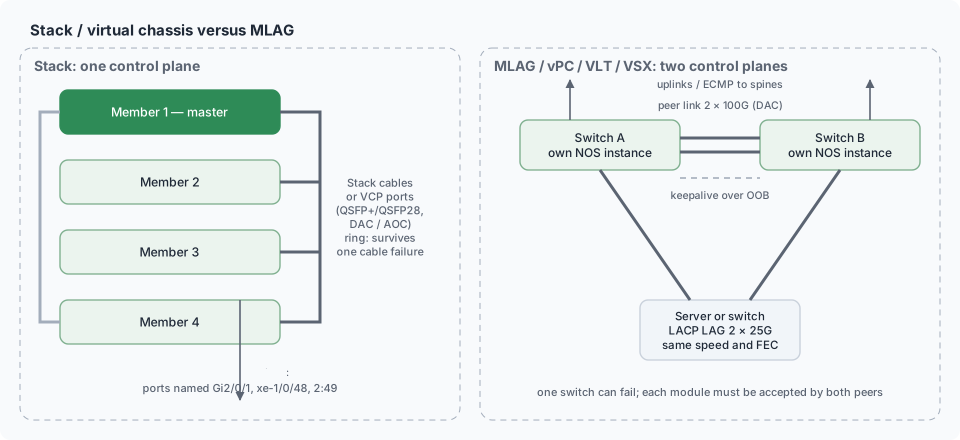
The three approaches
| Approach | Control plane | Data plane | Typical scale | Failure domain |
|---|
| Stack (ring/chain of fixed switches) | one (master + members) | shared backplane over stack cables | 2–10 units, one rack/closet | whole stack on master failure or software bug |
| Virtual chassis / cluster (two or more chassis or fixed switches over front ports) | one | forwarding across inter-chassis links | 2 (sometimes more), can span rooms | both |
| MLAG / vPC / VLT / VSX | two independent | peer link + keepalive; each switch forwards locally | 2 | one switch; the other keeps forwarding |
| L3 leaf–spine with ECMP (no pairing) | independent | routed | any | one link or box; others unaffected |
Technologies by vendor
| Vendor | Stacking | Chassis-style virtualisation | MLAG-type pairing |
|---|
| Cisco | StackWise (Catalyst 9200/9300: StackWise-160/480/1T) over dedicated rear cables; FlexStack (2960-X) | StackWise Virtual (Catalyst 9500/9600) over front 40G/100G optics; Nexus 2000 FEX | vPC (Nexus) |
| Juniper | Virtual Chassis (EX2300…EX4650, QFX5100/5120) over dedicated VCP or converted QSFP+/QSFP28 uplinks | Virtual Chassis Fabric (spine-leaf VC) | MC-LAG; EVPN-multihoming preferred now |
| HPE Aruba | VSF (AOS-CX 6200/6300) over front ports; backplane stacking on 6300 with cables | VSX (8320/8325/8400) over ISL | VSX is MLAG-style (two control planes) |
| HPE/H3C | IRF (Comware) over front 10G/40G/100G ports | IRF spans chassis | M-LAG (Comware 7) |
| Huawei | iStack (S-series) over stack cards or front ports | CSS (cluster switch system, chassis) | M-LAG (CloudEngine) |
| Dell | stacking (OS10 fixed) over front ports | — | VLT (Virtual Link Trunking) |
| Arista | none | — | MLAG (peer link over front ports) |
| Extreme | SummitStack over rear or front ports (EXOS); VOSS clustering | — | MLT/SMLT, vIST (VOSS) |
| Ruckus | stacking over 10G/40G front ports (ICX) | — | — |
| Nvidia / Cumulus | none | — | MLAG (CLAG) over peer bond |
| SONiC | none | — | MCLAG (community/vendor implementations) |
| MikroTik | none | — | MLAG (RouterOS 7, CRS3xx/5xx) |
| Brocade FC | — | — | fabric, no pairing needed (SAN design) |
Cabling and optics for stacking
| Stack type | Cable / module | Optics rules |
|---|
| Dedicated rear stack ports (StackWise, 6300 backplane, iStack cards) | proprietary cables, 0.5–3 m, 40–480 Gb/s aggregate, special connectors | no transceivers; cables are vendor-specific and checked |
| Front-port stacking / VCP over QSFP+/QSFP28 (Juniper VC, IRF, VSF, iStack over uplinks, ICX) | standard 40G/100G DAC, AOC or optics — the port is converted to stack mode (request virtual-chassis vc-port set pic-slot 0 port 48) | the same optics policy as for uplinks applies; DAC is the usual choice within a rack, AOC/SR4/LR4 between rooms (Juniper VC allows long-reach VCP across buildings); converting a port to VCP removes it from the uplink pool |
| StackWise Virtual / CSS / VSX ISL | 2–4 × 40G/100G front ports with standard optics | link members should be identical modules; ISL loss splits the pair |
| MLAG peer link | 2+ × 40/100/400G between the pair (DAC in one rack) | must be the fastest, most redundant link in the pair; peer keepalive over OOB |
Stack cables have EEPROMs of their own on several platforms; a non-genuine or damaged cable shows as a member that never joins.
What stacking changes for the operator
| Aspect | Effect |
|---|
| Port names | first number becomes the member ID: Gi2/0/1, xe-1/0/48, 2:49 (Port naming & LEDs) |
| Uplinks | spread across members (one per member) so a member failure keeps the stack connected; LAG across members |
| Optics inventory | show inventory / show chassis hardware lists modules per member — the same PN may be accepted on one member's software image and not on a mixed-version stack |
| Software upgrade | whole stack (ISSU on some); a stack reload takes every optic down |
| Master election | on failure, ports keep forwarding (NSF) but management moves |
| Ring vs chain | ring survives one cable failure; chain does not |
| Mixed models | limited by vendor (same family, same license, sometimes same model) |
MLAG specifics
| Item | Rule |
|---|
| Peer link | 2 × the largest uplink speed, LAG; carries orphan-port and failover traffic |
| Keepalive | separate path (OOB) to detect split-brain |
| Downstream | server or switch with an LACP LAG whose members go to both peers — identical speed/FEC on both members (Forwarding basics) |
| Consistency | VLANs, MTU, STP settings and FEC on member ports must match on both peers; mismatch → LAG member suspended |
| Optics | a downstream host's two DACs land on two switches: buy and code them as a pair |
| Modern alternative | EVPN multihoming (ESI-LAG) removes the peer link; pure L3 to the host removes pairing altogether |
| Symptom | Cause | Where to look |
|---|
| Stack member never joins, stack LED off | stack cable seated wrong, not genuine, or port not converted to VCP | cable EEPROM/LED, show switch stack-ports, show virtual-chassis vc-port |
| VCP link flaps, members re-elect | marginal optics/DAC on the VCP | DDM on the VCP port (Link flapping) |
| MLAG member suspended on one peer | FEC/speed/MTU mismatch between the peers' member ports | Port configuration recipes |
| Half the servers lose a path after upgrade | one peer's new release rejects third-party optics | Compatibility matrices & firmware |
| Peer link down, split-brain | peer-link DAC failure with keepalive misconfigured | design: two members on different cards |
In CodingBox
Stacking and MLAG double the places a module must be accepted: the same coded identity has to pass on both members or both peers, sometimes on two software versions. Read and record the modules of a pair together, and treat VCP-converted uplinks as uplinks in the inventory (Check transceiver, Code database).
 English
  Русский
  中文
中文  Español
  Deutsch
  Français